
FREE CHROME EXTENSION
Backlink Check: find your link on the page in your tab
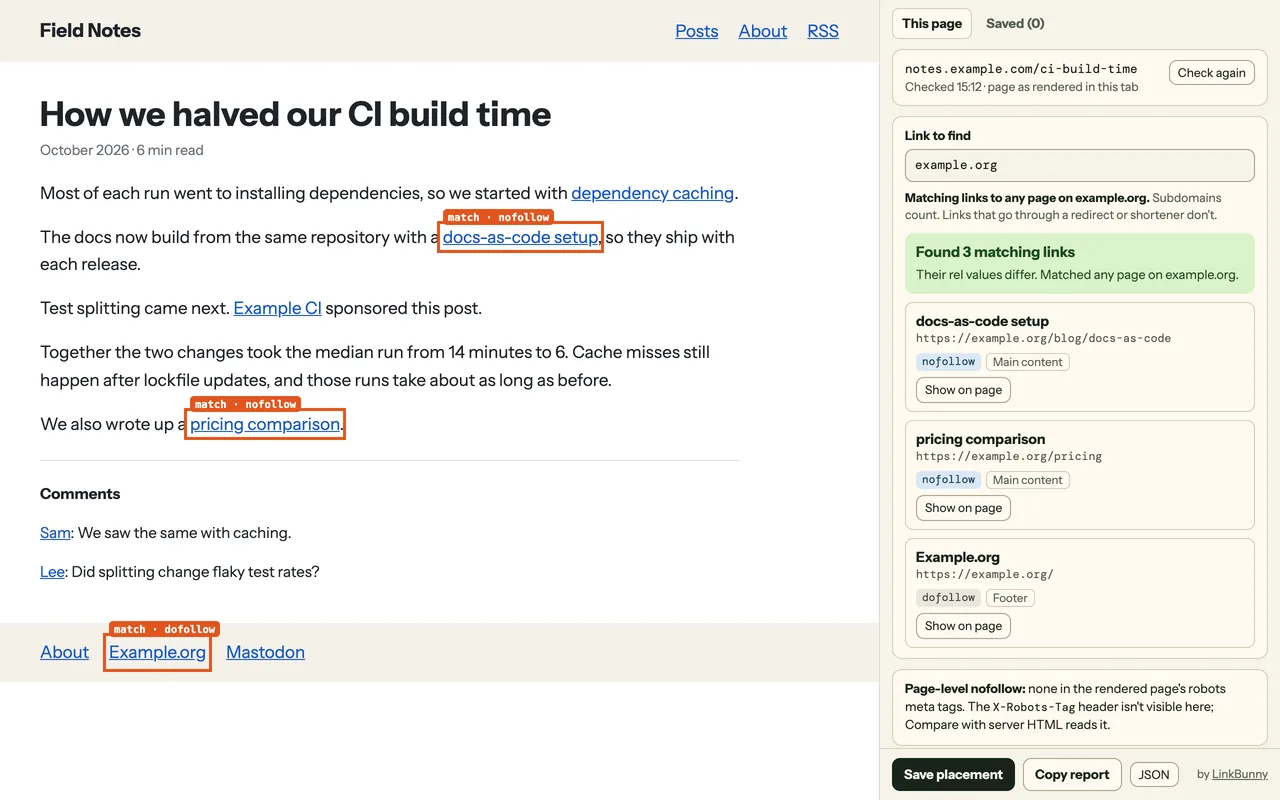
Open the page that should link to you and click the Backlink Check icon. A side panel shows whether your link is there, its rel value, where it sits on the page and whether readers can see it. Free, no account, Chrome 121 or later.
Add to Chrome from the Web StoreBacklink Check is made by LinkBunny.
How to use it
- Install Backlink Check from the Chrome Web Store and pin it to the toolbar.
- Open the page that should link to you, such as a guest post or a directory listing.
- Click the Backlink Check icon, or press Alt+Shift+K. The side panel opens.
- Type what you're looking for in Link to find: a domain such as
example.orgfor any page on that site (subdomains count), a full page URL such ashttps://example.org/pricingfor that one page, or a path such as/pricingfor a page on the site you're checking. - Save the placement, or copy a report for your notes or your coding agent.
What the side panel shows
- Each matching link's rel value:
nofollow,sponsored,ugc, or dofollow when the link has none of them. - Where the link sits (such as main content, navigation, footer or comments) and whether it's hidden or off-screen.
- Every other link on the page, external and internal, filterable by rel.
- Page-level nofollow from the page's robots meta tag.
- The page's canonical link: whether it names this page, points elsewhere, keeps the path with another query string, is missing or unusable, or whether the canonical tags disagree. A canonical is a hint, so this doesn't show which URL Google chose.
Backlink Check reads the page as Chrome rendered it, after JavaScript ran. Links that a script adds show up, and pages behind a login or drafts on a local dev server can be checked too. Links that go through a redirect or a link shortener don't count as matches.
For a public HTTPS page, Search this URL on Google opens a Google site: search for the page in a new tab, without its query string. Google's site: results aren't complete, so it isn't an index check.
Compare with server HTML
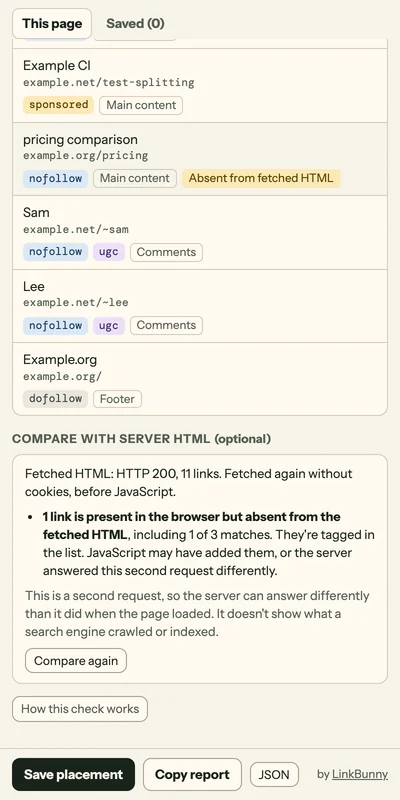
Some links only exist after JavaScript runs. Click Compare with server HTML and your browser requests the same page again from its site, without cookies, then lists the links that are missing from the HTML before JavaScript. It also reads the page's X-Robots-Tag header and flags a canonical that JavaScript added, removed or changed.
The comparison is a second request, so the site can answer differently than it did when the page loaded. It doesn't show what a search engine crawled or indexed.
Saved placements and reports
Save a placement to keep the last result for each page, and export your saved placements as CSV. Copy a report as Markdown or JSON to paste into your notes, an issue or a coding agent. Saved placements stay in the extension's storage on your device.
Permissions and privacy
Backlink Check asks for activeTab, scripting, sidePanel and storage. It has no host permissions, so it can read a page only after you click its icon or press its shortcut in that tab. While its side panel stays open, it checks that tab again when the tab moves to another page on the same site.
The page's address, links and link text are read in your browser and aren't sent to LinkBunny. Compare with server HTML is the one feature that makes a network request for the page, and it goes from your browser to that page's own site, only when you click it. Search this URL on Google sends the page's address, without its query string, to Google as a search, also only when you click it.
Anonymous usage events, such as which feature you used and whether the link was found, go to PostHog. They never include page addresses, domains or link text, and PostHog receives your IP address with each event. The privacy policy lists exactly what is stored and sent.
Backlink Check or LinkBunny's web checkers
Use the extension when you already have the page open, when the page needs a login, or when a script might add or change the link. LinkBunny's web checkers read the HTML a public page returns, without running JavaScript:
- The backlink placement checker checks one page for one expected link, and your coding agent can run the same check through MCP.
- The nofollow link checker lists every link on a public page with its rel value.
Questions
Does it find backlinks I don't know about?
No. Backlink Check looks at the page you open. It doesn't crawl the web, list the sites linking to you or estimate rankings.
Does it tell me whether Google indexed the page?
No. Search this URL on Google opens a site: search, but those results aren't complete. Use Search Console's URL Inspection for Google's view of a page.
Do I need a LinkBunny account?
No. Backlink Check is free and needs no signup, subscription or API key. LinkBunny's paid product is separate: your coding agent exchanges relevant nofollow links with other sites.